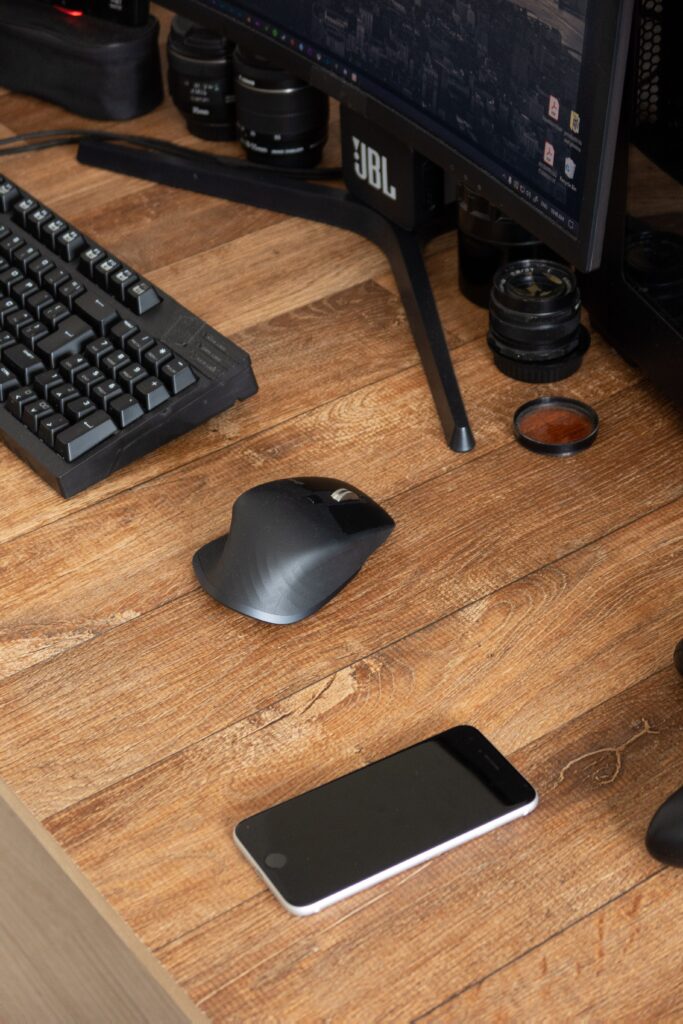
Looking for the best ergonomic mouse to prevent wrist pain? Discover our top premium and budget picks to upgrade your remote work setup.
At Remote Desk Space, we evaluate office gear based on real-world utility, ergonomic design, and value for money. After analyzing shape profiles, battery life, and tracking precision, we have narrowed down the top three ergonomic mice for any remote setup.
1. The Premium Choice: Logitech MX Master 3S
The Ultimate Productivity Investment
For remote professionals, software developers, and creatives who demand flawless execution, the Logitech MX Master 3S stands completely unrivaled. It is widely considered the gold standard for office mice, and for good reason.
Ergonomics & Design
The MX Master 3S features a deeply sculpted, right-handed asymmetric profile that coaxes your hand into a natural, relaxed posture. The integrated thumb rest keeps your hand completely off the desk surface, preventing friction and pressure on the carpal tunnel.
Key Performance Features
- MagSpeed Magnetic Scrolling: The machined steel scroll wheel is virtually silent and can spin through 1,000 lines of code or spreadsheets in a single second, shifting automatically from tactile clicking to free-spin.
- Quiet Click Switches: The 3S version introduces clicks that are 90% quieter than its predecessor, making it perfect for jumpy Zoom calls or quiet shared spaces.
- 8K DPI Tracking: The advanced optical sensor tracks seamlessly on any surface, including high-gloss glass desks, without requiring a mousepad.
- App-Specific Customization: Using the Logi Options+ software, you can configure the side buttons and thumb wheel specifically for apps like Excel, Chrome, Photoshop, or Microsoft Teams.
Battery Life & Connectivity
A full charge via USB-C lasts up to 70 days, and a quick one-minute charge delivers three hours of use. It pairs with up to three devices simultaneously via Bluetooth or the Logi Bolt receiver, allowing you to switch between a work laptop and a personal PC at the press of a button.
2. The Value Ergonomic Choice: Logitech Lift Vertical
The Best Ergonomic Relief for Smaller Hands
If you are already experiencing wrist twinges or want a purely health-focused design without breaking the bank, a vertical mouse is the solution. The Logitech Lift turns traditional mouse design on its side—literally.
Ergonomics & Design
The Lift places your hand at a precise 57-degree angle, mimicking what ergonomists call the “natural handshake position.” This specific posture completely removes pressure from your wrist and reduces muscular strain in your forearm by preventing your radius and ulna bones from crossing. It is designed specifically for small-to-medium hand sizes (if you have larger hands, the Logitech MX Vertical offers the same shape on a larger chassis).
Key Performance Features
- SmartWheel Scrolling: The scroll wheel provides precision line-by-line scrolling when navigating documents, but shifts to high-speed scrolling if you flick it quickly.
- Whisper-Quiet Operation: Like the premium MX line, the main buttons are incredibly quiet, maintaining a peaceful workspace.
- Textured Comfort Grip: The back of the mouse features a soft, ribbed rubber surface that feels premium and ensures a secure, sweat-free hold.
Battery Life & Connectivity
The Lift operates on a single AA battery (included), which lasts up to an incredible 24 months. It connects via Bluetooth Low Energy or the included Logi Bolt USB receiver and supports cross-computer control using Logitech Flow.
3. The Budget Alternative: Logitech M650 Large / Signature
Reliable, Comfortable Performance Under $40
You don’t need to spend nearly a hundred dollars to get a comfortable, ergonomic upgrade. The Logitech M650 series offers exceptional daily performance, clean aesthetics, and basic contouring at a fraction of the cost.
Ergonomics & Design
The M650 features a symmetrical, gently contoured shape with soft rubber side grips that naturally guide your thumb and fingers into place. Unlike most budget mice that come in a “one-size-fits-all” format, the M650 is available in standard and large sizes (M650 L), ensuring a proper fit that prevents hand cramping during long shifts.
Key Performance Features
- SmartWheel Technology: Despite its budget price tag, it includes the smart scroll wheel that switches between precision and speed scrolling instantly.
- Customizable Side Buttons: Two handy thumb buttons can be mapped to your favorite shortcuts, such as back/forward in a browser or mute/unmute on video calls.
- SilentTouch Technology: Removes distracting clicking noises completely, keeping you focused during deep work sessions.
Battery Life & Connectivity
Powered by a single AA battery, the M650 lasts up to 24 months using the Logi Bolt USB receiver, or up to 20 months over a standard Bluetooth connection.
Final Verdict: Which Ergonomic Mouse Should You Choose?
- Choose the Logitech MX Master 3S if you are looking for a heavy-duty productivity upgrade with advanced custom shortcuts, multi-device switching, and premium glass-tracking capabilities.
- Choose the Logitech Lift if your main goal is relieving or preventing wrist pain, carpal tunnel symptoms, or forearm fatigue.
- Choose the Logitech M650 if you want a simple, highly reliable, and silent daily driver that fits comfortably without spending a lot of money.